For a long time, I've set myself the challenge of launching mobile application projects faster by reducing the constraints that typically slow down the process.
The first constraint to overcome was developing for multiple platforms simultaneously. Flutter solved this by allowing me to work on a single codebase to create applications that work equally well on iOS and Android, significantly reducing development time.
Once development is completed, the second constraint that arises is publishing on Apple and Google stores. This process requires purchasing a license, submitting the application to their servers, preparing graphic elements and descriptions, then waiting for validation to finally be visible and downloadable by users. Even though verification and validation processes have been reduced, this doesn't eliminate the entire deployment process for each application update.
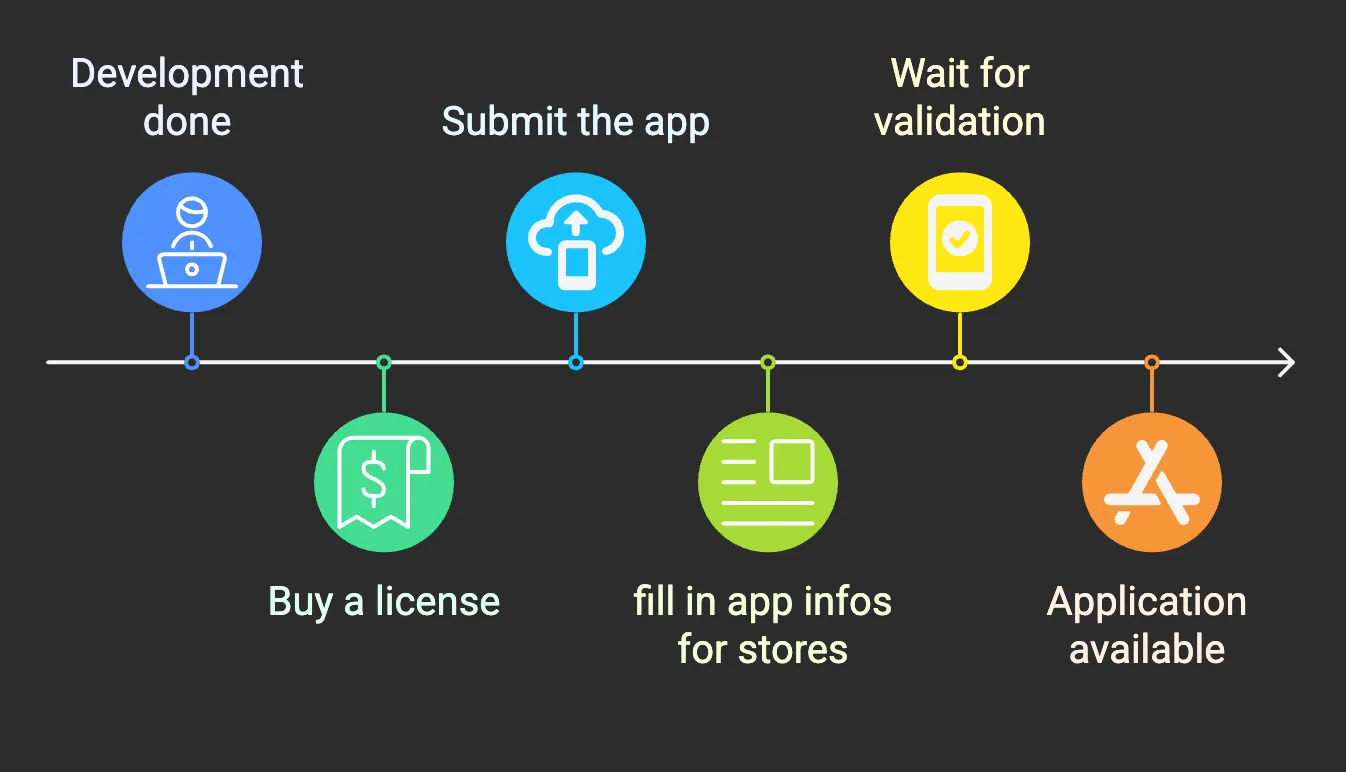 Mobile App Publishing Process to do for each platform
These steps become particularly constraining when trying to quickly offer a testable version and efficiently iterate with our first users. By adding up development time, distribution time, and all external factors related to launching such as communication and marketing, we quickly see weeks, if not months, accumulate before really reaching our target audience.
Why Build a Progressive Web App (PWA)?
The answer lies in PWAs (Progressive Web Apps), a technology that has been around for about a decade. PWAs allow access to an application directly from a web browser without going through the stores. Companies like Facebook and Google have long adopted this approach for their services. The goal is simple: offer universal access to users, regardless of their device. A PWA is essentially a website that looks and behaves like a mobile application.
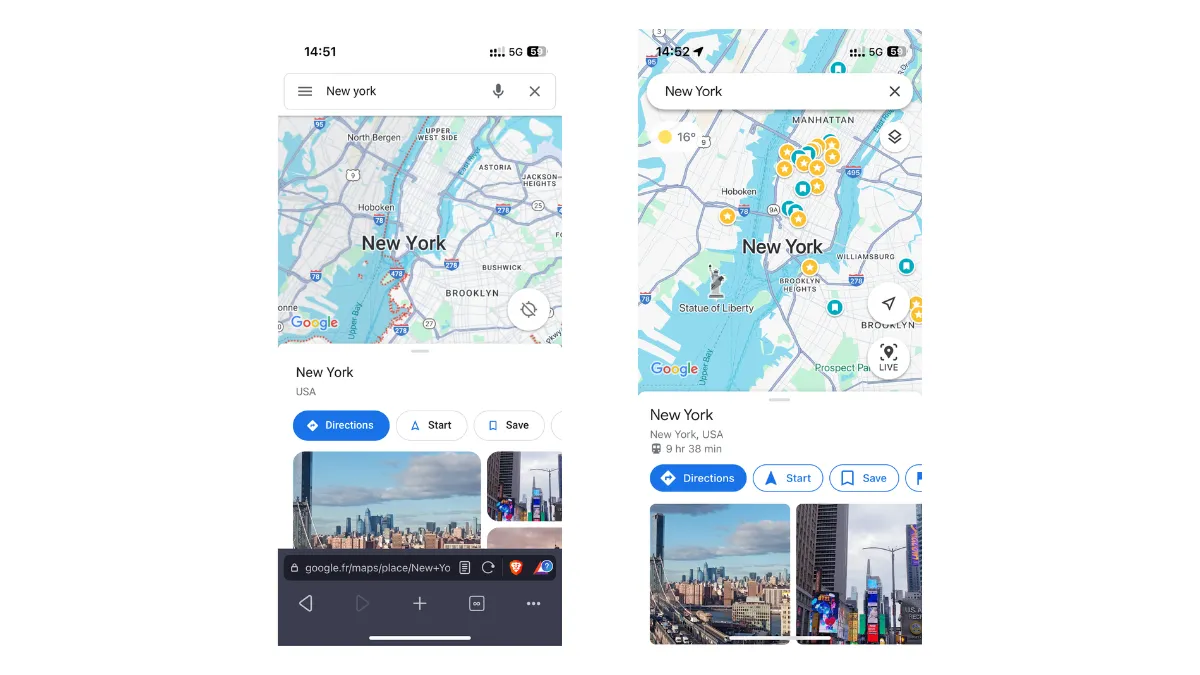 On the left, Google Maps from a browser, and on the right, the native app
Traditionally, PWA development required web development skills. The technologies typically used were React, Angular, or other frameworks like Next.js or Nuxt.js.
As a mobile platform specialist, I had never taken the leap until recently. Flutter's constant evolution and its active community have enabled complete support for the web (in addition to iOS and Android) and therefore the possibility of creating PWAs. This was perfect for me as I already master this framework.

Flutter Web and PWA User Experience
Questions about user experience quality had already emerged when comparing native development to cross-platform development. What about for an application running from a web browser? Unsurprisingly, a PWA cannot completely replace a native application in terms of user experience.
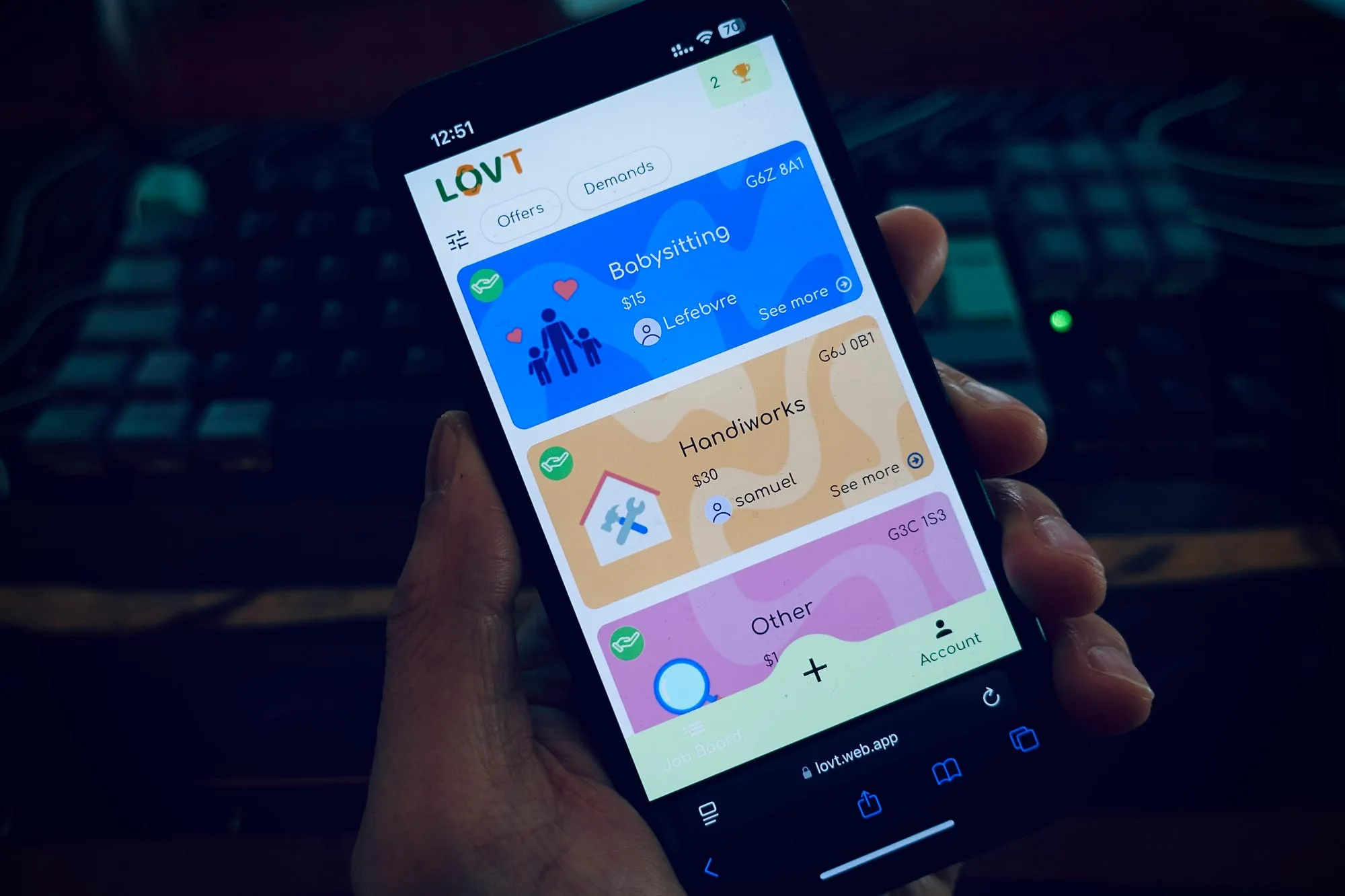
Nevertheless, once installed on the home screen, the browser's address bar completely disappears and the application offers a much more immersive experience than most users would be able to distinguish from a native app. Flutter Web allows us to preserve a large part of the visual experience, and animations generally remain fluid thanks to Material and Cupertino widgets that faithfully reproduce the characteristic designs of iOS and Android.
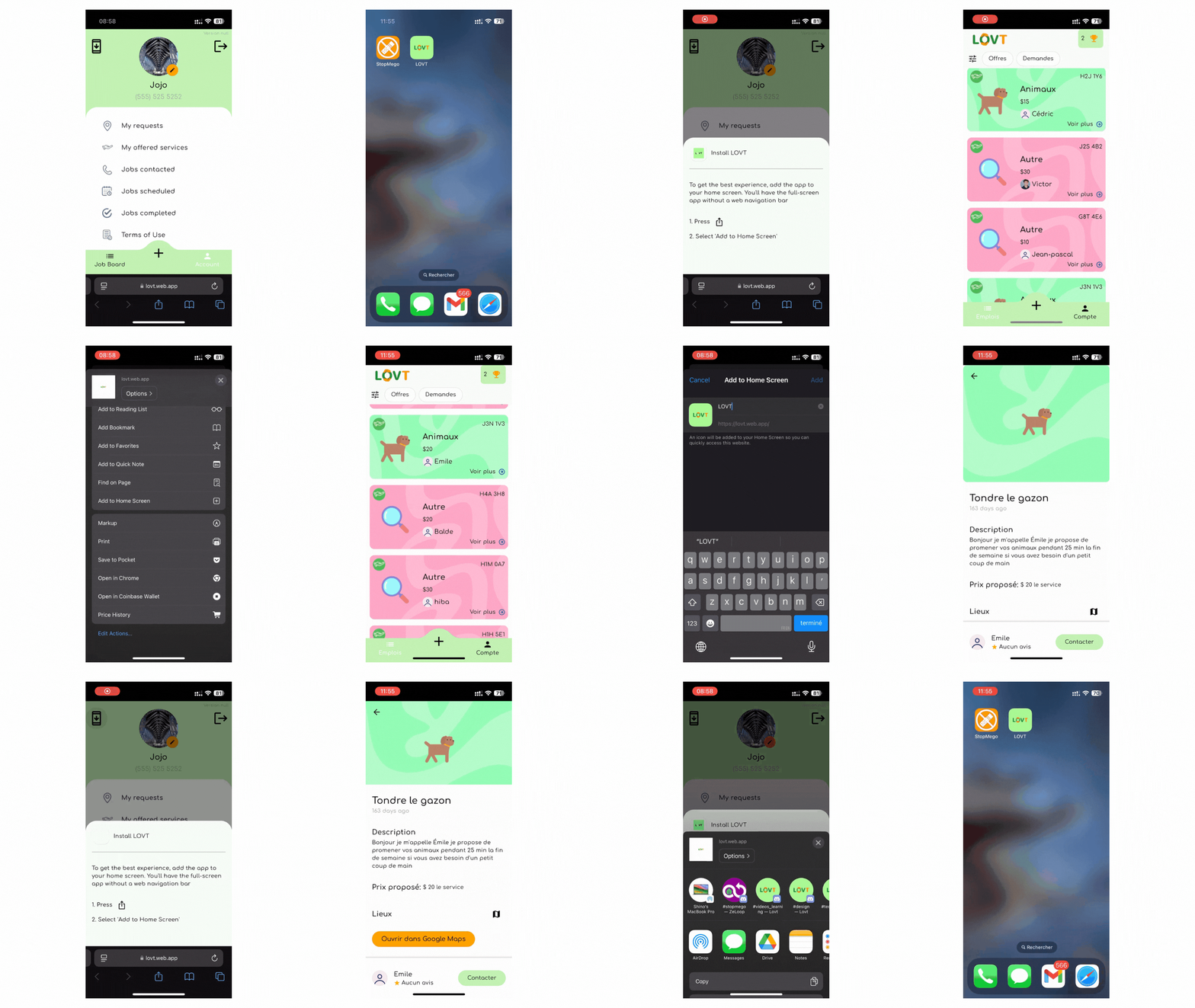 PWA installation differs from the classic method (left) but the result is rather convincing (right)
Even if installation can be complicated, the application remains functional from the browser, although the experience is slightly degraded. The goal here is not to offer the perfect experience, but rather to be quickly available to as many people as possible while offering an experience close enough to satisfy our users.
Technical Constraints of Flutter PWAs
The web environment imposes certain unavoidable constraints compared to native applications.
First, the execution model fundamentally differs: a native application communicates directly with the operating system, while a PWA operates through a browser, adding a layer of abstraction that can affect performance.
Next, despite constant progress in web APIs, access to system functionalities remains more limited than in native. Browsers also impose strict restrictions on resource usage, which can compromise the performance of complex applications.
Finally, elaborate animations and sophisticated touch interactions may lose fluidity, particularly on devices with limited resources.
Of course, some differences persist. Performance can fluctuate depending on the browser used and the device's power, and typographic rendering doesn't always match the precision obtained in native.
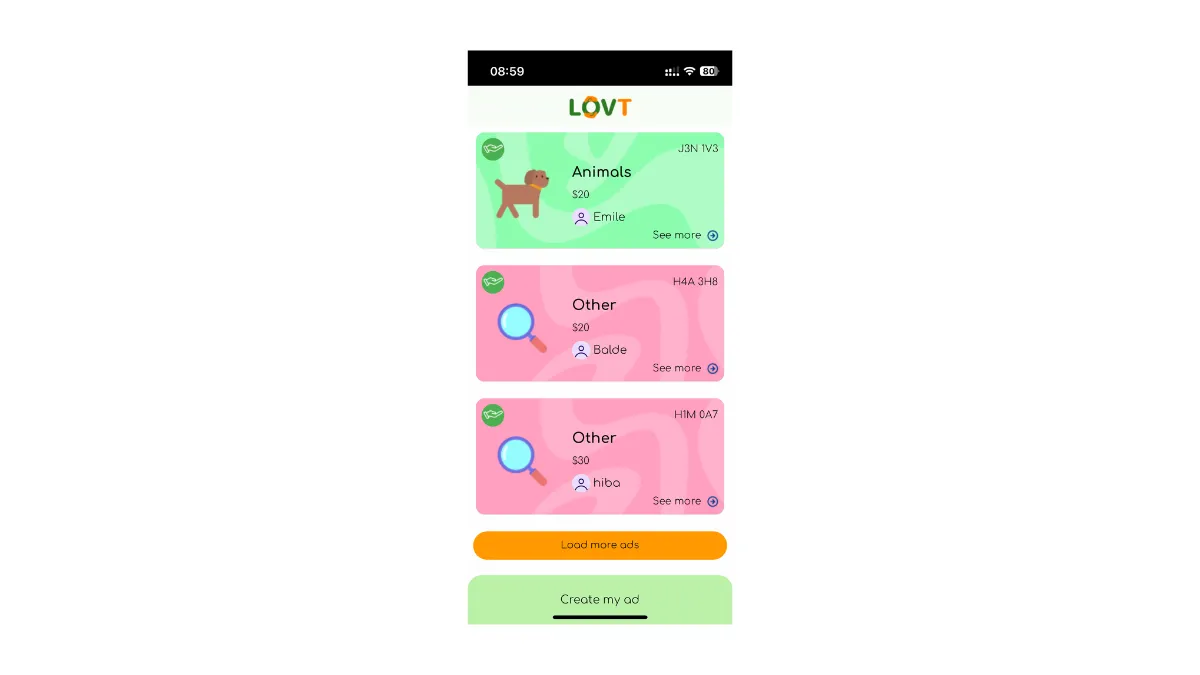 Despite the appearance of a native app, we are indeed in a web browser
These constraints must be taken into account from the application's design stage, but they don't constitute an insurmountable obstacle for most use cases. The key is to adapt your interface and functionality to the capabilities of the web platform while taking advantage of its specific benefits.
How to Build and Deploy a Flutter PWA
The Flutter community has done tremendous work to manage application execution in the web environment. From a technical standpoint, the Flutter source code, written in Dart, is compiled and optimized for JavaScript. Then a script initializes the Dart runtime environment and loads the application. Images, fonts, and other resources are optimized and packaged to be efficiently loaded in the browser.
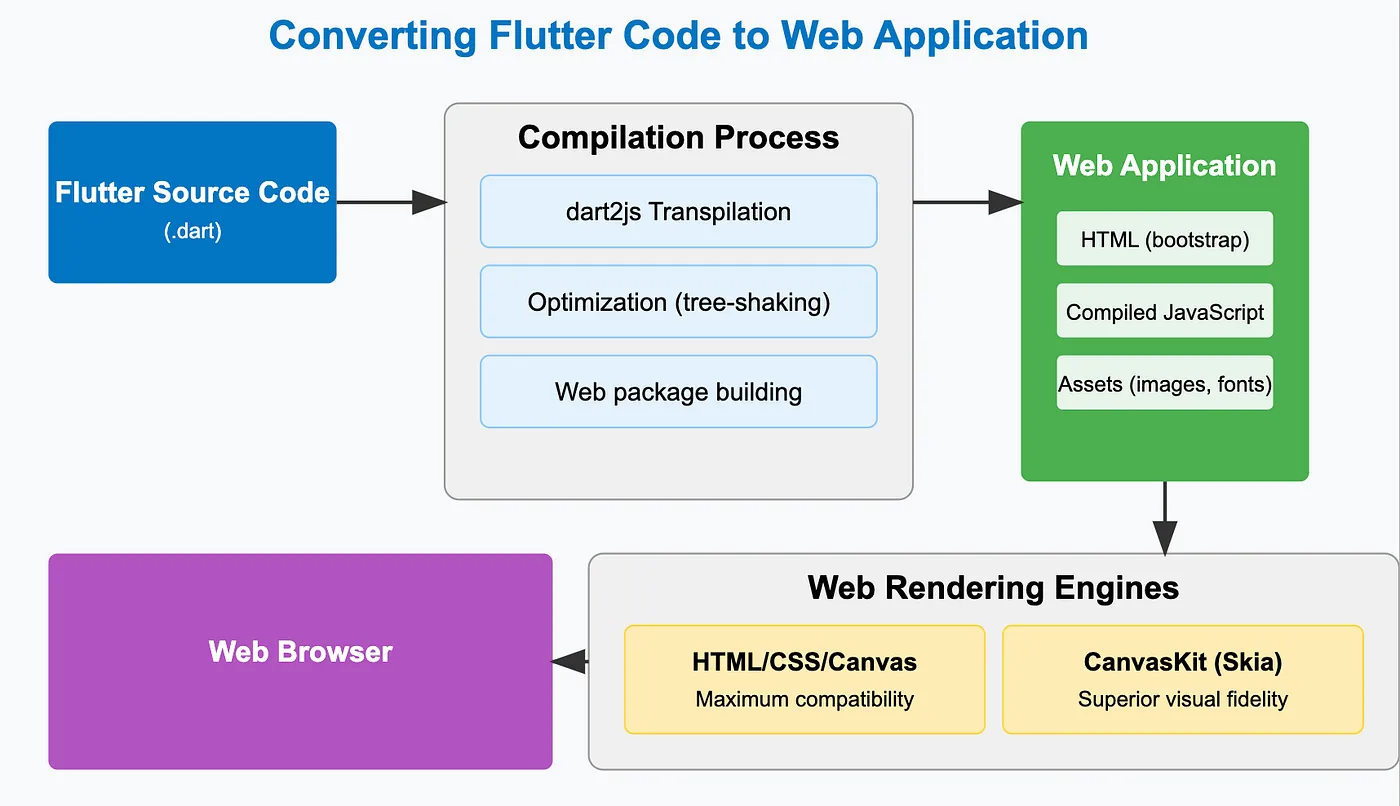 Flutter web architecture compiling Dart to JavaScript for PWAs
All of this occurs behind the scenes. The developer can focus on the code they already master! Then, to make their application available, deployment is incredibly simple:
- Fill out the
manifest.jsonfile that corresponds to the app's presentation elements
json53 lines1{ 2 "name": "LOVT", 3 "short_name": "LOVT", 4 "start_url": ".", 5 "display": "standalone", 6 "background_color": "#0175C2", 7 "theme_color": "#0175C2", 8 "description": "LOVT is the new app to find a job dedicated for youngs", 9 "orientation": "portrait-primary", 10 "prefer_related_applications": true, 11 "icons": [ 12 { 13 "src": "icons/Icon-192.png", 14 "sizes": "192x192", 15 "type": "image/png", 16 "purpose": "any" 17 }, 18 { 19 "src": "icons/Icon-512.png", 20 "sizes": "512x512", 21 "type": "image/png", 22 "purpose": "any" 23 }, 24 { 25 "src": "icons/Icon-maskable-192.png", 26 "sizes": "192x192", 27 "type": "image/png", 28 "purpose": "maskable" 29 }, 30 { 31 "src": "icons/Icon-maskable-512.png", 32 "sizes": "512x512", 33 "type": "image/png", 34 "purpose": "maskable" 35 } 36 ], 37 "screenshots": [ 38 { 39 "src": "/images/narrow.png", 40 "type": "image/png", 41 "sizes": "400x780", 42 "form_factor": "narrow", 43 "label": "Application" 44 }, 45 { 46 "src": "/images/wide.png", 47 "type": "image/png", 48 "sizes": "400x375", 49 "form_factor": "wide", 50 "label": "Application" 51 } 52 ] 53}
- Generate web files
bash1 lines1flutter build web --release --web-renderer html
- Configure deployment on the hosting platform (Firebase Hosting for us) by pointing to the generated web files
json28 lines1{ 2 "hosting": { 3 "public": "build/web", 4 "site": "lovt", 5 "ignore": [ 6 "firebase.json", 7 "**/.*", 8 "**/node_modules/**" 9 ], 10 "rewrites": [ 11 { 12 "source": "**", 13 "destination": "/index.html" 14 } 15 ], 16 "headers": [ 17 { 18 "source": "**", 19 "headers": [ 20 { 21 "key": "Cache-Control", 22 "value": "no-cache, no-store, must-revalidate" 23 } 24 ] 25 } 26 ] 27 } 28}
- Deploy to the server
bash1 lines1firebase deploy
And that's it! No submission to stores, no waiting for approval. For updates, it's even simpler: just redeploy the files, and users will have the new version on their next visit (or the next page refresh).
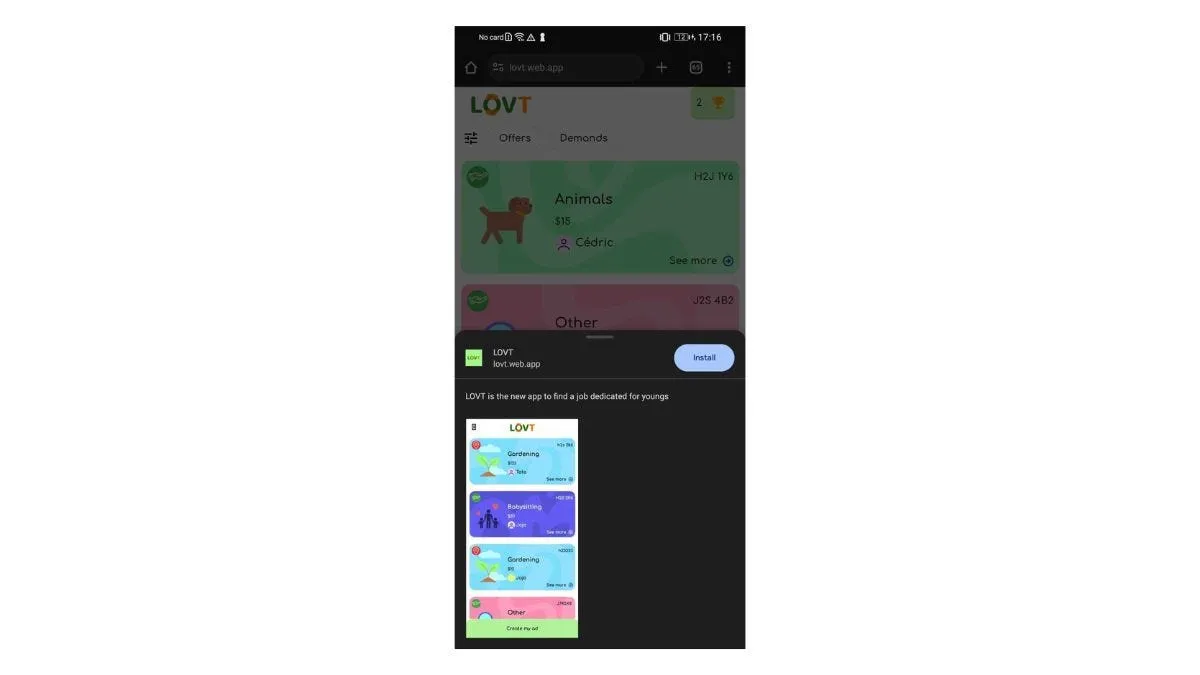 On Android devices, some browsers automatically display the installation window
Pros and Cons of Flutter PWAs
Using the PWA approach with Flutter enabled me to launch the LOVT application in record time. From the initial phase of feature specification to public deployment, the project only required a few weeks — a timeframe that would have been unthinkable with the traditional development and validation cycle of native applications.
This rapid execution provided a significant strategic advantage: the ability to test our concept in the real market without massive investment in time and resources. We were thus able to adopt a truly agile approach, collecting feedback from early users, identifying areas for improvement, and deploying fixes sometimes within just a few hours.
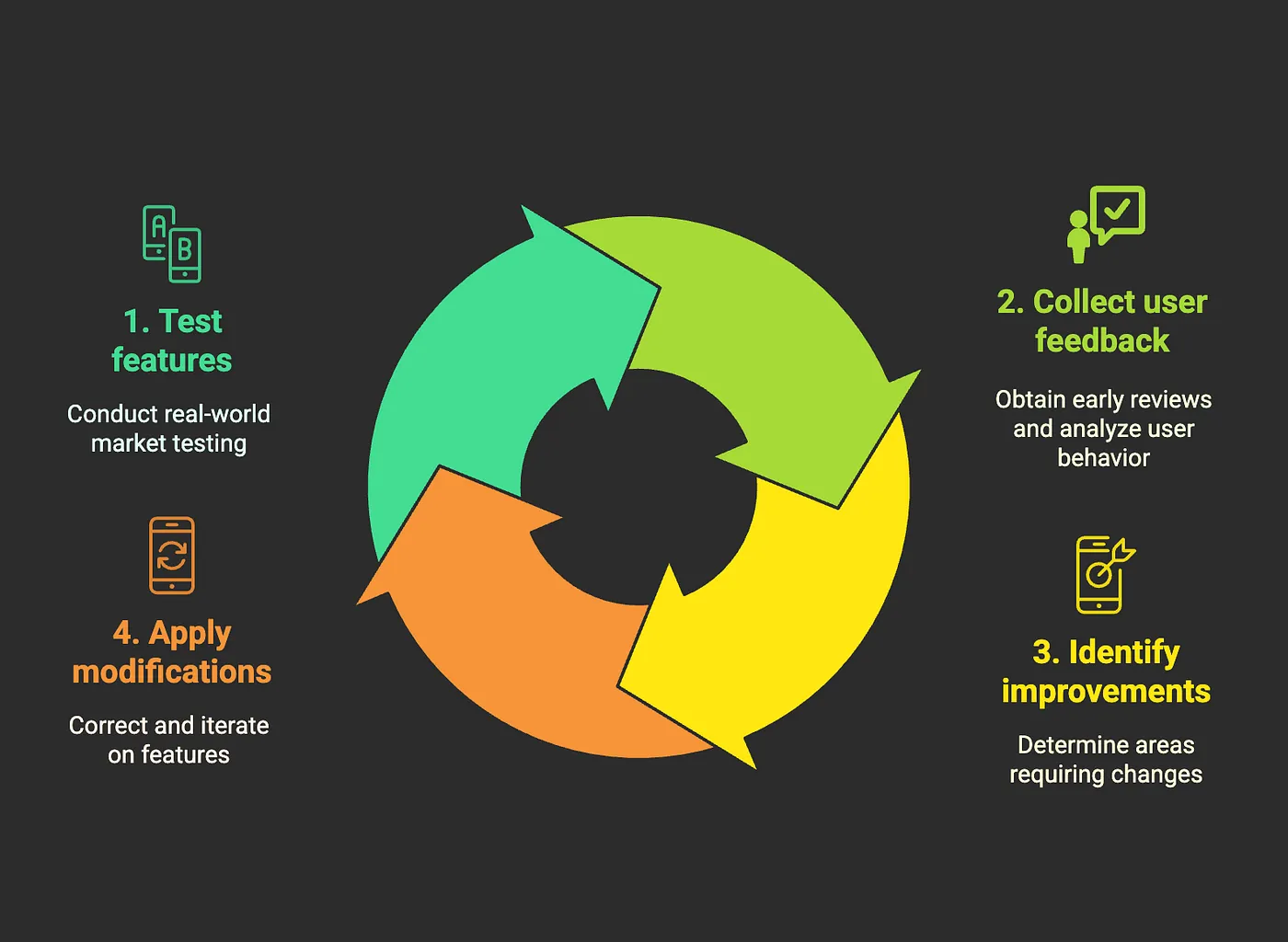 Agile workflow enabled by Flutter PWA fast deployment
After several weeks of real-world usage, here is a detailed analysis of the advantages and disadvantages I've been able to observe with our Flutter PWA:
Advantages
Ultra-fast deployment cycle: Updates can be deployed in minutes, without waiting for store validation. This responsiveness allowed us to fix critical bugs and improve the user experience almost instantly. For a concrete example, we identified a registration issue related to TikTok and Facebook at 6 PM and deployed the fix before 8 PM the same day. We also avoided the multiple back-and-forths sometimes necessary to obtain Apple and Google’s approval, considerably shortening the time between development and making it available to users.
Financial and operational savings: The absence of license fees ($99/year for Apple, $25 for Google) may seem anecdotal, but it's especially the saving of resources related to preparing store submissions that proved significant. This lightness extends to the infrastructure level: thanks to our architecture based on Firebase, we have, to date, incurred no hosting or maintenance costs, thus optimizing our development and operation budget.
 Steve Jobs announcing zero server costs with Firebase and PWA
Extremely simplified distribution: Sharing the application via a simple URL (https://lovt.web.app) proved to be very effective for virality. Combined with a QR code, we were able to facilitate account creation and application use during our organized events.
Universal accessibility: Simultaneous availability on iOS and Android without distinction allowed us to reach a wider audience. The application theoretically remains accessible on any device with a modern web browser, including older models that might not necessarily support the latest versions of native applications.
Disadvantages
- Absence from official stores: Although access via URL simplifies direct sharing, the absence from official stores limits our potential visibility. In a word-of-mouth context, we found that new users naturally looked for the application on the App Store or Play Store before realizing it was accessible only via the web. We estimate that this absence from official distribution platforms represents a loss of organic acquisition of about 15% compared to a traditional application.
 Confused user searching for the app on the Apple App Store
Installation friction: Although initial access is immediate, the process of installing a PWA on the home screen remains counter-intuitive for many users. Our statistics show that only 23% of regular users have actually “installed” the application, others using it directly via the browser. We had to create a specific tutorial to encourage installation.
Technical limitations of native APIs: Permission management proved to be problematic in certain contexts. iOS and Android require user-validated permissions to access features like the camera or geolocation. Going through the browser, these validation mechanisms can malfunction depending on user actions, sometimes preventing the use of certain essential functionalities.
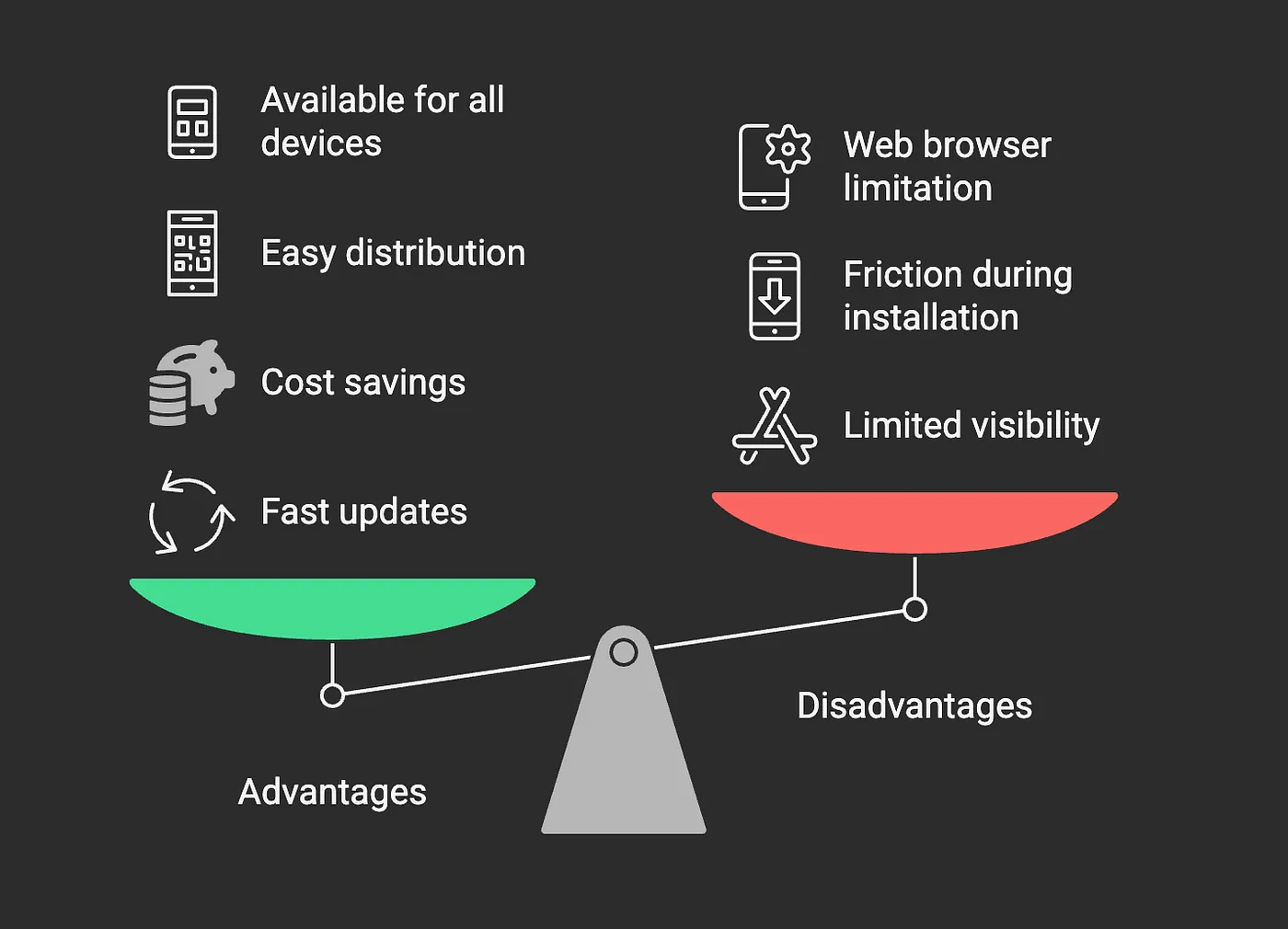 choose between execution speed and user experience
Conclusion: A Proven Alternative
In terms of execution speed, I haven't found anything better than developing PWAs to launch apps quickly. No, it’s not perfect and will never be as refined as native apps, but it opens a new path for those who want to quickly test their ideas.
What truly convinced me? The ease of deployment and the absence of all constraints related to Apple and Google stores. This flexibility allowed me to focus on the essentials: developing features and responding to user feedback.
Of course, there are compromises to make. The technical limitations of the web are factors to consider depending on your product. For LOVT, these disadvantages were largely offset by the speed of market entry and update flexibility.
A PWA is perfect for testing your concept and refining your product. Once your idea is validated and your product is stable, you can migrate to a more traditional process. This mixed approach allows you to enjoy the best of both worlds: the initial speed of PWAs and the rich experience of native applications when your project is more mature.
In a future article, I’ll show you another interesting aspect of using PWAs.