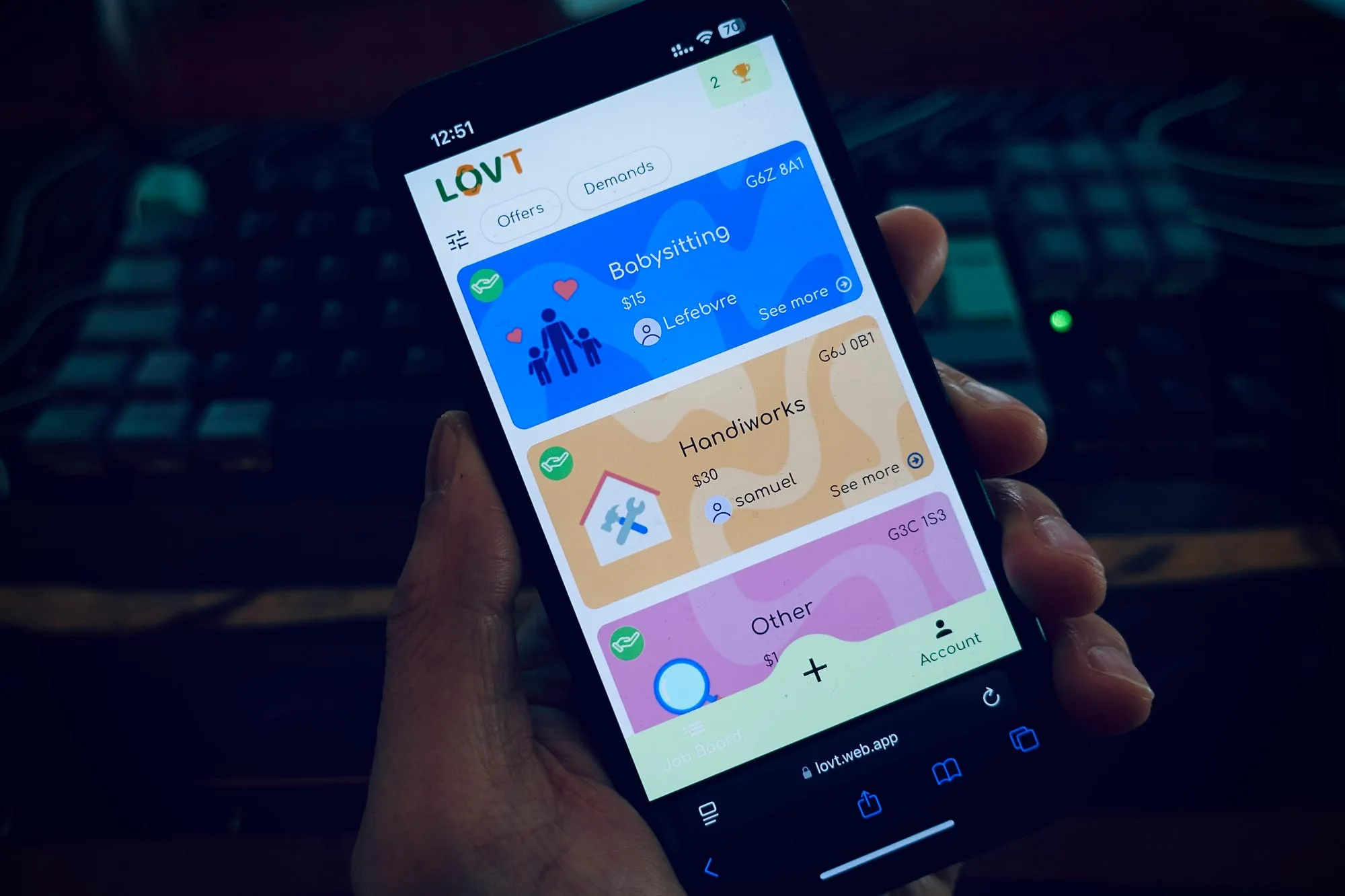
During the development of my latest application, LOVT, I used my trusty stack of Flutter + Firebase, a powerful and ideal combination for projects in the market testing phase, with the goal of moving quickly.
Why use Flutter and Firebase?
Flutter is a well-known framework for building cross-platform applications from a single codebase. For our project, we used Flutter Web to make the application quickly accessible.
Firebase, on the other hand, is an extremely popular backend service among developers, offering a turnkey solution with a database, removing the need for infrastructure management. This is particularly useful for us as our Flutter application is hosted and uses its database.
Firebase includes a free tier plan with quotas to follow, such as the number of reads and writes to the database, as well as the amount of files stored and downloaded.
This combo is ideal for testing a market, attracting new users, and focusing on the product, with the advantage of being free (up to a certain point).
 Firebase cost savings with Flutter lazy loading
The Firebase Read Quota Challenge
LOVT is an app that allows users to view service offers and requests. It features an introduction phase to present the app, followed by a list of services. The idea is to give a preview to non-registered users. Once signed up or logged in, users can access the details of each service and contact the relevant individuals.
 Flutter app fetching all Firebase documents without lazy loading
After a soft launch to our early adopter community, I quickly realized that the initial acquisition flow was going to be problematic.
Loading the service list twice (once before logging in and again after) would soon cause us to hit the Firebase quota limit. Ten services displayed equals to ten database reads. Considering the potential growth in the number of services and registered users, we were likely to exceed the 50,000 daily read limit.
Implementing Lazy Loading in Flutter
To prevent this potential overload, I thought it was the perfect time to implement lazy loading.
Lazy loading allows data to be loaded only when needed. For large volumes of data, it boosts performance and reduces memory usage by avoiding loading everything at once. In our case, although we didn't yet have a huge amount of data, I used it to gradually load the list of services, anticipating a future increase in volume.
For the existing UI, it was sufficient to load only six results at a time, allowing users to see a full list on the first display. To view more services, they simply needed to scroll down to load six more.
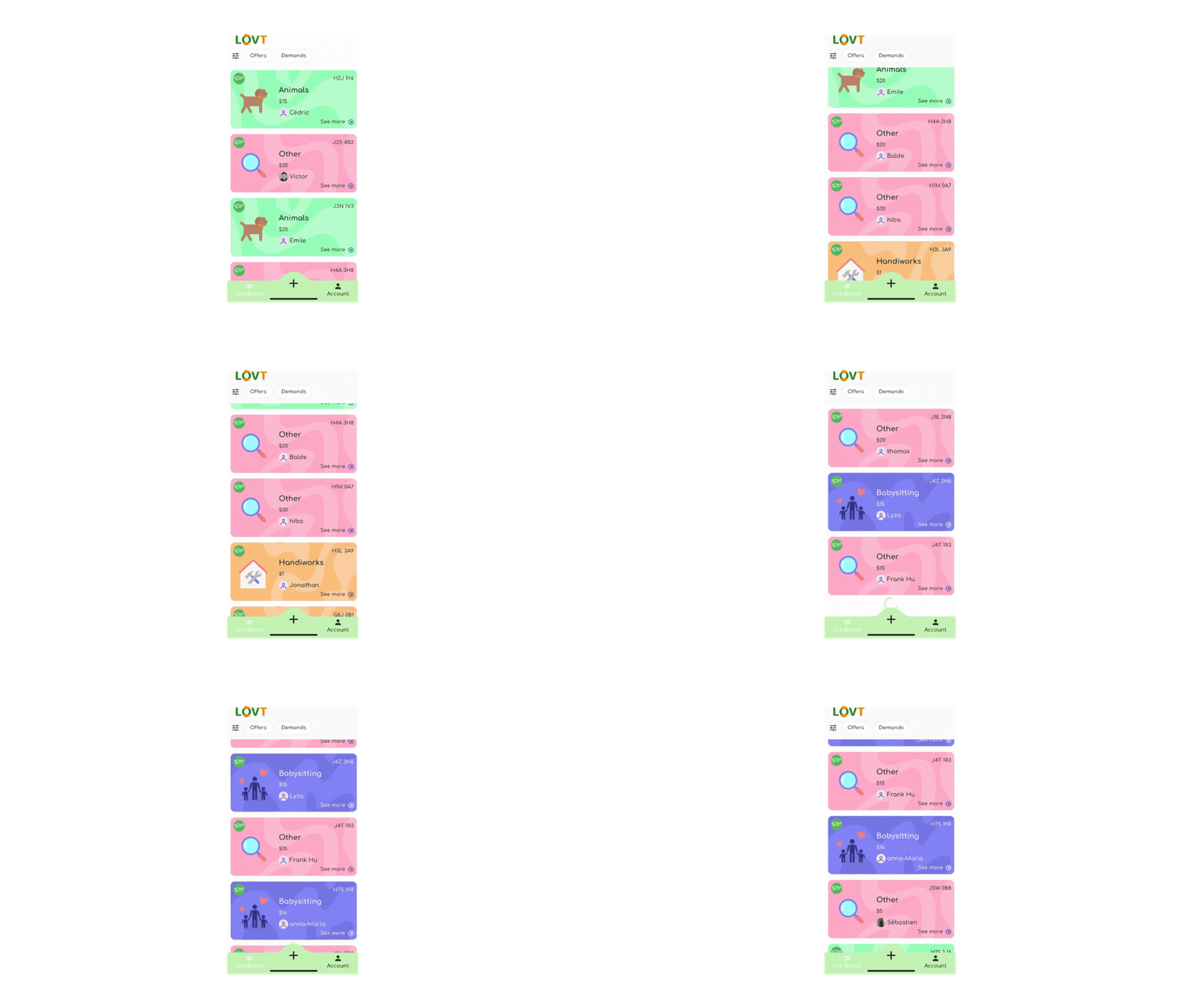 Flutter app implementing lazy loading pagination with Firebase
From a coding perspective, it looks like this:
In my repository class, I build the Firestore query by limiting the number of results to 6.
dart34 lines1Future<PaginatedJobPosts> getJobsAvailable( 2 {DocumentSnapshot? lastDocument, int limit = 6}) async { 3 4 try { 5 6// Define a query with a limit 7 Query query = _firestore.collection("jobPosts").limit(limit); 8 9 if (lastDocument != null) { 10 query = query.startAfterDocument(lastDocument); // continue after the last document 11 } 12 13// Map the data from firestore 14 final querySnapshot = await query 15 .withConverter<JobPost>( 16 fromFirestore: (snapshot, _) => JobPost.fromMap(snapshot.data()!), 17 toFirestore: (job, _) => job.toMap(), 18 ) 19 .get(); 20 21// Prepare the data to return 22 final jobs = querySnapshot.docs.map((doc) => doc.data()).toList(); 23 24 final lastDoc = 25 querySnapshot.docs.isNotEmpty ? querySnapshot.docs.last : null; 26 27// Return an object PaginatedJobPosts to be manipulated in the view 28 return PaginatedJobPosts(jobs, lastDoc); 29 30 } catch (e) { 31 debugPrint("Error fetching jobs: $e"); 32 return PaginatedJobPosts([], null); 33 } 34 }
Then, in the view, I display the query results and handle loading additional data.
dart35 lines1// NotificationListener to handle scroll down event 2return NotificationListener<ScrollNotification>( 3 onNotification: (ScrollNotification scrollInfo) { 4 5 // Check if it is the bottom of the list 6 if (scrollInfo.metrics.pixels == scrollInfo.metrics.maxScrollExtent && 7 !isLoadingMore) { 8 _loadMoreJobs(); // Request more results from firebase 9 } 10 return false; 11 }, 12 13 // Load the list view 14 child: ListView.builder( 15 itemCount: _allJobs.length + (_hasMoreData ? 1 : 0), 16 itemBuilder: (context, index) { 17 18 if (index == _allJobs.length) { 19 return const Center(child: CircularProgressIndicator()); 20 } 21 22 return Container( 23 margin: const EdgeInsets.symmetric(horizontal: 6, vertical: 4), 24 child: JobPostCard( 25 jobPost: _allJobs[index], 26 onTap: () => context.goNamed( 27 AppRoute.jobDetail.name, 28 pathParameters: {'id': index.toString()}, 29 extra: _allJobs[index], 30 ), 31 ), 32 ); 33 }, 34 ), 35 );
dart19 lines1Future<void> _loadMoreJobs() async { 2 // Manage loader 3 if (ref.read(loadingNotifierProvider) || !_hasMoreData) return; 4 ref.read(loadingNotifierProvider.notifier).setLoading(true); 5 6 // Call repository to get more results 7 final paginatedJobs = 8 await ref.read(getJobsAvailableProvider(_lastDocument).future); 9 10 if (paginatedJobs.jobs.isEmpty) { 11 _hasMoreData = false; 12 } else { 13 _allJobs.addAll(paginatedJobs.jobs); 14 _lastDocument = paginatedJobs.lastDocument; 15 } 16 17 // Manage loader 18 ref.read(loadingNotifierProvider.notifier).setLoading(false); 19 }
Code details here
By applying this loading limit, the number of database reads significantly decreased. Firebase only counts the elements returned in the query, meaning that if you load six results, it counts as six reads — far fewer than if you were to load all the data at once.
Firebase Read Quota Reduction Results
Did the implementation of lazy loading actually help?
Thanks to a highly effective TikTok campaign, we experienced a significant spike in acquisitions, allowing us to test and confirm the effectiveness of this optimization.
So, how did the performance compare before and after lazy loading?
Before optimization: With around 200 sign-ups, we were close to 43,000 readings in the database.
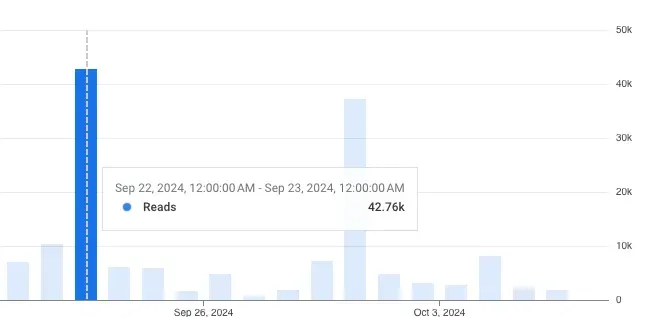 High Firebase database reads before Flutter lazy loading optimization
After optimization: With nearly 650 sign-ups, the peak number of reads dropped to around 37,000. This means we tripled the number of sign-ups while reducing the read quota!
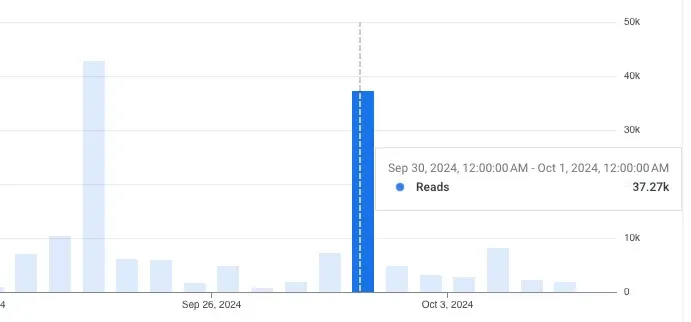 Reduced Firebase database reads after Flutter lazy loading optimization
Benefits of Lazy Loading in Flutter
- Cost reduction: We stayed within Firebase's free tier.
- Performance improvement: Faster load times for users.
- Memory savings: By avoiding loading the entire list of services at once.
- Scalability: The app can handle more users without increasing costs.
In summary, lazy loading has proven to be very effective for our app. Not only did it allow us to stay within Firebase's free tier, but it also gave us better scalability margins.
For a startup like LOVT, with limited resources, every way to optimize and save matters. The trio of Flutter, Firebase, and lazy loading is validated on my end. What do you think?
 Successful Flutter and Firebase lazy loading implementation